




jQuery is a library widely used for web development, and in WordPress we have this library included in the default installation package.
In this article, I’ll show you how and why you should replace WordPress’s default jQuery with jQuery from Google CDN (Content Distribution Network).
But why should you replace it?
Generally speaking, you should do this so the script loads faster for the end user.
Here are the points that should lead you to adopt this practice.
Caching
Perhaps the great benefit of including jQuery hosted by Google is the chance that your visitors won’t even need to download jQuery. This happens because, if a user has already visited another site using jQuery hosted by Google, they’ll already have the library in their browser cache, thus avoiding a new request.

Low Latency
Google has jQuery distributed geographically across several servers, so when a browser requests a URL for the jQuery library, the file will be downloaded from the Google server closest to the end user’s location.
Parallel Requests
Another advantage of using it is that your server won’t be overloaded, and there will be parallel requests to complete your website page’s loading cycle.
Free
The main reason you should use this service is that it brings you the benefits mentioned above and, above all, it’s free.
How do I replace WordPress’s default jQuery?
This is very simple, first open the directory containing the theme you’re using, /wp-content/themes/NOME-DO-SEU-TEMA/. Then find the file called functions.php and add the following lines at the end of the file:
| |
If the functions.php file doesn’t exist in this directory, you should create it and add the following lines as the file’s content:
| |
But if I don’t use WordPress, can I use Google CDN?
Of course you can! To implement this on your website, you can change the line where you include the jQuery library, changing the src attribute to the Google CDN address. This line is usually located in the head block of the html document, or at the end of the page before the tag .
The line you should change should look like the code below:
| |
Change the line mentioned above to:
| |
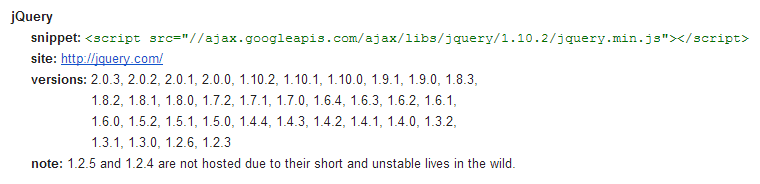
jQuery Versions on Google CDN
In the image below you can check the jQuery versions you can use on Google CDN.
Done!
Save the changes, and when you reload your website you’ll already be using jQuery provided by Google CDN.
Do you have questions or suggestions? Did you already know about or use this practice in your projects? Leave a comment!