




An HTML (HyperText Markup Language) document is a set of instructions in ASCII format used to create hypertext documents that can be viewed in a WWW Web Browser (such as Internet Explorer, Mozilla Firefox, Apple Safari, etc).
To create an HTML page you only need a text editor that lets you save files in “ASCII with line breaks” format, such as “Notepad” or_ “Sublime Text 2″ _on Windows.
To view the HTML document, simply open it in your favorite browser.
The HTML language consists of tags (markers), which the browser interprets and displays.
HTML markup follows this pattern:
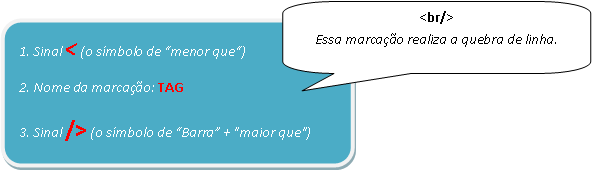
- NOTE: the image below illustrates the syntax of the HTML markup language without a closing pair.
- NOTE: the image below illustrates the syntax of the HTML markup language with a closing pair.
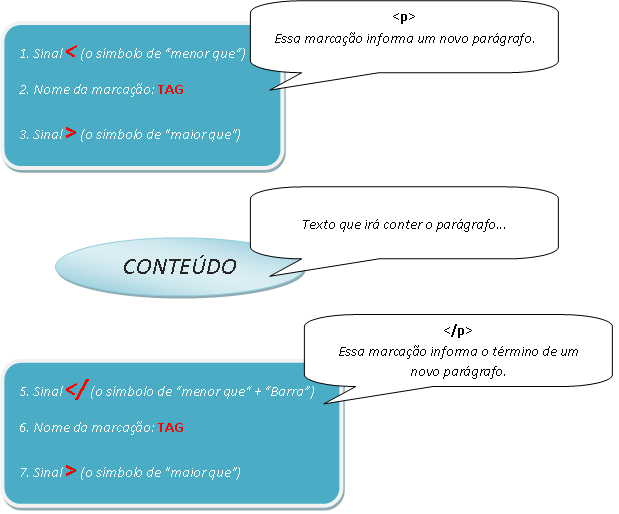 HTML markup language syntax
with a closing pair
HTML markup language syntax
with a closing pair
As in the second image – generally speaking – tags appear in pairs, for example:
| |
Where:
<p> Indicates that a paragraph should be created.
</p> Indicates that the paragraph is finished.
The symbol that ends a given piece of markup is the same as the one that starts it, preceded by a slash (/).
There are exceptions to this paired behavior of markup. For example, the tag indicating a line break, <br>,
does not need a matching tag either, nor do others such as <hr>.
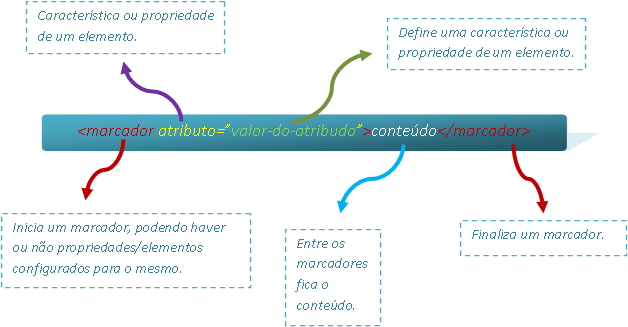
Tags can optionally contain attributes. An attribute defines a characteristic or property of an element. It is always included in an element’s (tag’s) initial (opening) tag, using the syntax: attribute-name="value”.
An element can have several attributes, separated by blank space(s).
The image below illustrates HTML markup language syntax using attributes:
Important: HTML does not distinguish between uppercase and lowercase (it is NOT
“case sensitive”). So the notation
<title></strong> is equivalent to <strong><TITLE></strong> or <strong><TiTlE></strong>. </p></title>.
See an example of an HTML page below:
| |
Research Sources: